
Blog
How to Use a QR Code for Wedding Invites and RSVPs Without a Website

Table of Contents
Introduction
Hey lovers, Gonzalo here 👋🏻👋🏻👋🏻!
Let’s talk wedding planning for a sec, invites and RSVPs to be precise. It’s no secret that weddings can get expensive fast, and honestly, who wants to spend a fortune on a wedding website or complicated RSVP systems when there’s a simple and more importantly, free option…
Quick Overview: With just 10 to 15 minutes of your time and a little creativity, you can create a QR Code for Wedding Invites or RSVPs that lets your guests RSVP via email—straight from their phones. No websites. No extra fees. Just you being smart and making things easy for yourself.
You’ll still need to pop that QR code onto something (like your save the dates or invites), but trust me, this little trick is going to save you a heap of stress and cash.
Ready?
Let’s dive in!
Why Use a QR Code for Wedding Invites or RSVPs?
Here’s the thing: QR codes are kind of a lifesaver.
They’re modern, sleek, and eco-friendly, and they make RSVPing ridiculously easy. Even the oldies are getting used to using them!
Plus, by skipping a wedding website, you can:
- Save money that you can spend on something more fun (hello, honeymoon fund!).
- Keep things organised directly in your email inbox.
- Make it super simple for your guests to respond with just a quick scan.
It’s a win-win, right?
What You’ll Need
To follow this guide, you’ll need:
- An email address: This is where you’ll collect RSVPs.
- Access to the internet: To use free online tools like Mailto Link Generator and QR Code Monkey.
- A computer or smartphone: For creating and downloading the link and QR code.
- Wedding invites or save the date cards: To add the QR code.
- Optional design tool: Something like Canva to customise your invites.
Complexity Level
This is a beginner-friendly process. Even if you’re not tech-savvy, the tools mentioned are straightforward and easy to use. You’ll be done in under 15 minutes!
The end result.
Let me show you what this magic looks like.
When your guests scan the QR code, it will immediately open their default email program on their phones or computer and they’ll see something like this:
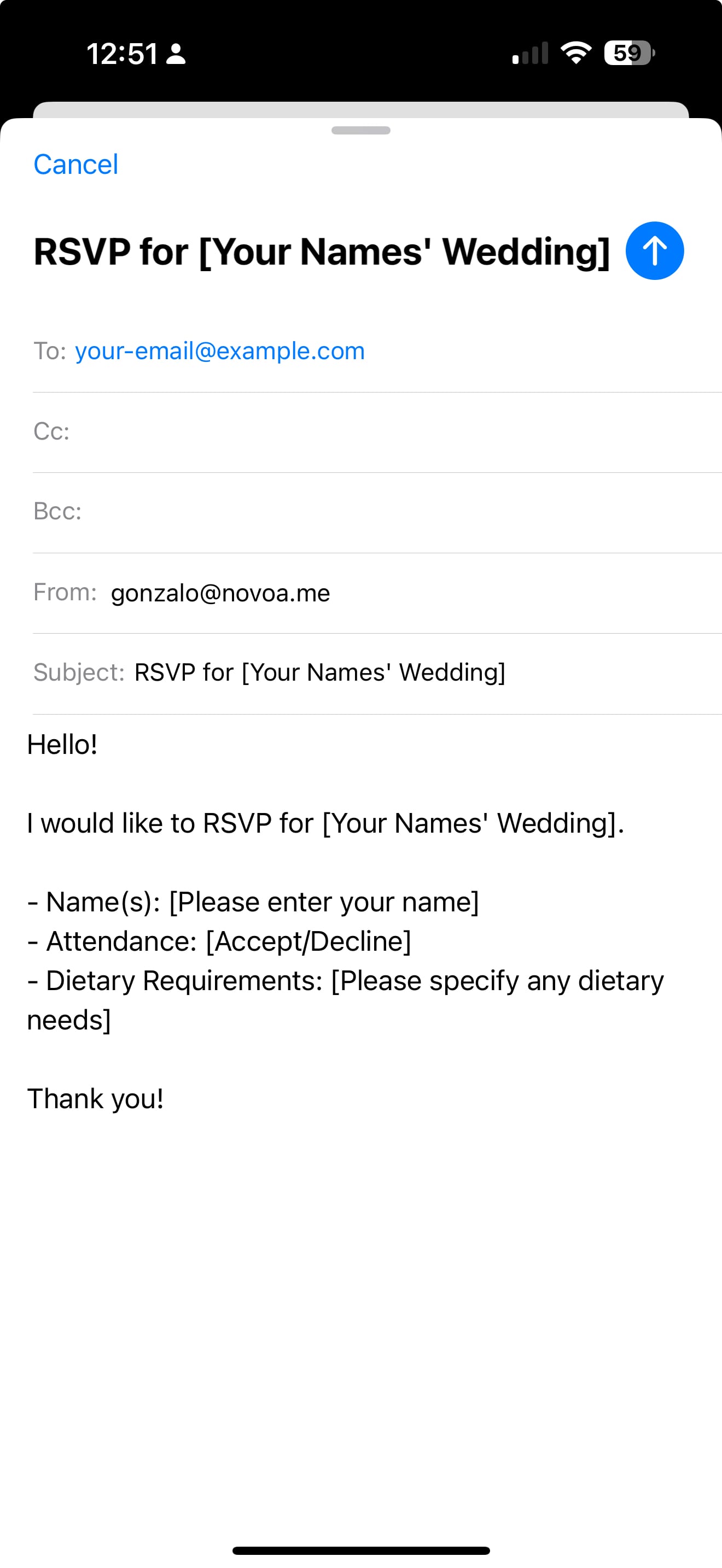
Now that you’ve seen the end result, let’s get into how you can make this happen.
Step-by-Step Guide
Step 1: Generate a Mailto Link
First things first, we’ll make a special link that works with email apps. Here’s how:
- Head over to Mailto Link Generator.
- Fill out these fields:**Email Address:**Enter the email where you want to get the RSVPs.
- Subject: Something like “RSVP for [Your Wedding]” works great.
- Body: Add a simple message that your guests can easily fill out. For example:
Here’s a Sample text you can use & modify:
To: your-email@example.com (Insert the email where you’d like to get the RSVPs in here.)

Cc: (Not needed, but you can use it to send a copy to someone)
Bcc: (Not needed, but you can use it to send a blind copy to someone)

Subject: RSVP for Alex & Blair’s Wedding

Body:
Hey Alex & Blair!
I would like to RSVP for your wedding! Here are my details:

Name(s):
Attendance: [Attending/Not Attending]
Dietary Requirements (if any):

Thank you!
Step 2: Create a QR Code from the Link
Next up, we’re turning that link into a QR code. Here’s what to do:
- Go to QR Code Monkey.
- Paste your mailto link into the “Your URL” field.
- Want to jazz it up? You can change the colour or add a cute icon (like a heart or wedding ring) to make it match your vibe.
- Hit “Create QR Code” and download it as a PNG file. Boom, you’ve got your QR Code!
Step 3: Add the QR Code to Your Invites
Here’s where the magic comes together:
- Add the QR code to your invite design. If you’re using a tool like Canva or Adobe InDesign, it’s super easy to drag and drop it in.
- Include a little note explaining what it is, like: “Scan this code to RSVP via email.”
- Print out your invites or send them digitally—whichever works best for you.
A Few Tips for Making It Extra Special
- Add a Personal Message: Write a little note next to the QR code like, “Scan to RSVP – We can’t wait to celebrate with you!”
- Encourage Guests to Reach Out: Mention that they’re welcome to email or text you with any extra questions. It’s all about creating an open, friendly vibe.
- Include Your Names on the RSVP: This helps make sure there’s no confusion, especially if some guests may not recognise your email address right away.

Conclusion
See? Told you it was easy!
By using a QR code for your wedding RSVPs, you’re keeping things modern, simple, and budget-friendly.
Plus, your guests will appreciate how straightforward it is.
So go ahead, give this a try, and take one more thing off your wedding planning plate.
You’ve got this, and your inbox is about to be a whole lot happier!
And hey, if you’re still searching for a photographer who understands that every wedding is one-of-a-kind, feel free to reach out. I’d love to chat about your vision and how we can bring it to life through images that capture the heart of your day.
Let’s make your wedding as seamless and unforgettable as possible—one thoughtful detail at a time! 😊
-Gonz
Speaking of weddings... 📷




Gonzalo Novoa
Perth Wedding Photographer · Storyteller · The Cheeky One
Interested?
Let's capture your story together
Every wedding is unique. Let's have a quick chat to see if we're the right fit.
See If Your Date Is Available →